
Harwing Powertech Case Study: Multi-Shift Attendance, Geo-Fencing and Field Tracking with Tankhwa Patra HRMS
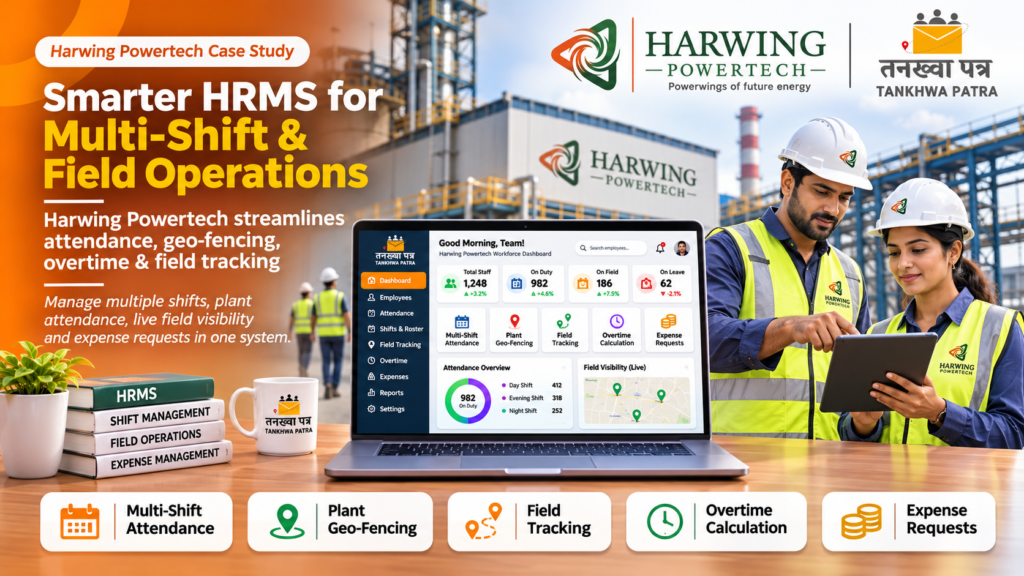
Quick answer: Harwing Powertech Pvt. Ltd. needed to manage employees across multiple shifts, several plant locations and field work. Tankhwa Patra HRMS gave it multiple shift assignment, overtime calculated from in and out times, geo-fenced plant attendance, live location and visit visibility, and employee expense requests. Shift, attendance, overtime and approved expense records now sit in one system that supports payroll.
A supervisor at a plant wants to know who has reached the shop floor. Another employee is visiting a customer across town, and a third has submitted a petrol claim on paper. At month-end, HR has to match shift timings, overtime hours, plant arrival times and expense bills before payroll can start. Each piece of information is in a different place, and each one needs checking.
Harwing Powertech faced this mix of shifts, plants and field work. This case study explains who Harwing is, the problems it faced, how Tankhwa Patra HRMS addressed each one and what changed. It also gives a before and after comparison, a 7-step setup workflow, a 9-point checklist and answers to common questions.
Please note: This case study describes one client’s setup. Live location tracking, geo-fencing and visit features depend on how the system is configured, on your plan and on the organisation’s permission. Live GPS tracking and geo-fencing are a paid add-on at Tankhwa Patra. Employee tracking should be used only with clear policy and employee consent, so check the current rules with a qualified legal or HR professional. Overtime, expense and payroll rules vary by state and change over time. This guide is not legal or tax advice.
Who is Harwing Powertech?
Harwing Powertech Pvt. Ltd. is a company with employees working across multiple shifts, multiple plant locations and field operations. It needed a more organised way to keep workforce records timely and consistent, because manual processes made that difficult.
| Client snapshot | Details |
| Client | Harwing Powertech Pvt. Ltd. |
| Website | harwingpowertech.com |
| Workforce | Employees on multiple shifts, at multiple plants and in the field |
| Platform | Tankhwa Patra HRMS and Payroll Software |
| Key needs | Overtime, plant-based attendance, location visibility, travel distance, visits and expenses |
What workforce challenges did Harwing Powertech face?
Harwing’s HR team handled shifts, plants and field work with manual processes. That made it hard to keep records timely and consistent. Seven challenges stood out.
- Multiple shifts: matching each employee’s attendance to the applicable shift timing.
- Overtime: keeping overtime records by hand and calculating overtime from working hours.
- Multiple plants: verifying when employees arrived at and left different plant locations.
- Employee location: knowing where an employee was when working outside the main office.
- Visits and travel distance: seeing employee visits and the distance travelled during field work.
- Employee expenses: handling petrol and other expense requests manually and working out eligible amounts.
- Payroll coordination: bringing attendance and overtime information together for payroll.
Why do manual methods fail for multi-shift, multi-plant and field teams?
Manual methods fail because the same worker can be on different shifts, at different locations and outside the office on different days. Each situation needs a separate check, and the checks are repeated at month-end, so errors and delays build up.
- Shift mismatch: attendance has to be compared against the right shift each time.
- Unverified location: a punch does not show whether the employee was inside the plant.
- Overtime disputes: hand-kept records rarely match the actual working hours.
- No field visibility: managers cannot easily see where field staff are or how far they travelled.
- Paper expenses: claims need manual checks for eligibility and amounts.
- Late consolidation: HR merges everything just before payroll, when there is little time to correct errors.
How did Tankhwa Patra HRMS solve each challenge?
Tankhwa Patra HRMS brought shifts, attendance, overtime, location, visits and expenses into one system. Each solution below matches a challenge above.
1. Multiple shift assignment
Tankhwa Patra allows multiple applicable shifts to be assigned to an employee. Attendance can then be assessed against the configured shift timings and rules, so every employee is judged against the right shift.
2. In and out time based overtime
In and out time records are used to calculate overtime under the configured rules. This reduces manual overtime tracking, and overtime comes from recorded times, not from handwritten notes.
3. Plant geo-fencing
Geo-fencing can be configured for plant locations so that location-based attendance is marked inside the permitted area. This helps HR verify attendance at designated plants.
4. Live employee tracking
Live location visibility helps authorised users check where an employee is when tracking is enabled and permitted by the organisation. This is useful for staff who work outside the main office.
5. Travel and visit visibility
Available location and visit records help managers review employee movement and travel distance, subject to the system configuration.
6. Employee expense requests
Employees submit expense requests in the system, including petrol and other eligible expenses. These are reviewed and calculated according to the organisation’s configured process.
7. Structured workforce records
Shift, attendance, overtime and approved expense information is managed together, which supports payroll-related activities.
| Challenge | Tankhwa Patra support | Operational value |
| Multiple shifts | Multiple shift assignment and configured shift timings | More consistent attendance handling |
| Overtime | In and out time based overtime calculation | Less manual tracking |
| Multiple plants | Geo-fencing for configured plant locations | Improved location-based verification |
| Location and visits | Live tracking and available visit records | Better field workforce visibility |
| Travel distance | Review of available tracking records | More visibility into employee movement |
| Expenses | Employee expense requests and review | More organised expense handling |
What changed for Harwing Powertech?
Harwing now has a more structured process for shifts and overtime, better verification of attendance at plants and clearer visibility of field work. Expense requests follow a defined process, and workforce records are better coordinated for payroll.
| Before Tankhwa Patra | With Tankhwa Patra |
| Manual overtime record management | Overtime calculated from recorded in and out times and configured rules |
| Difficulty verifying plant-based attendance | Geo-fencing supports location-based attendance at plants |
| Limited visibility into field employee locations and visits | Live tracking and available visit records improve field visibility |
| Manual handling of employee expense requests | Requests are submitted and reviewed through a structured process |
Results at a glance:
- More structured shift and overtime management.
- Improved verification of attendance at designated plant locations.
- Better visibility into employee location and field movement when live tracking is enabled.
- More organised review of visits and travel-distance information using available records.
- A clearer process for submitting and reviewing petrol and other employee expenses.
- Better coordination of workforce records for payroll-related processing.
These are qualitative outcomes for this deployment. Results for other companies depend on their requirements, setup and plan.
What is geo-fencing attendance, and how does it work?
Geo-fencing attendance means marking attendance only when an employee is inside a set location boundary, such as a plant. The company defines the permitted area for each location, and the system checks the employee’s position when attendance is marked. It helps verify that punches come from the right place.
How does live employee tracking work, and is it permitted?
Live tracking shows authorised users where an employee currently is, when tracking is enabled and permitted by the organisation. It suits field work, where a manager needs to know who is on a visit. Use it with a written policy and employee consent, limit access to authorised people and check the current rules with a legal or HR professional.
How does a shift, plant and field workforce setup work?
A typical setup starts by listing the shifts, plants and field roles, then configuring the rules, testing with real data and going live. The steps below show a common order, not a fixed timeline for every company.
- List shifts, plants and roles. Note shift timings, plant locations and which employees work in the field.
- Assign shifts. Create shifts and assign one or more to each employee.
- Set overtime rules. Define how in and out times convert to overtime and who approves it.
- Configure plant geo-fencing. Set the permitted area for each plant location.
- Set tracking and visit rules. Decide who is tracked, when and who may view it, and inform employees.
- Define expense categories. Set eligible expenses, including petrol, and the approval process.
- Run a parallel test month. Compare the system’s attendance, overtime and expense results with your current method before going live.
How do you choose an HRMS for shifts, plants and field staff?
Choose an HRMS that you can test against your real shifts, plants and field routines. Ask the vendor to set up your own rules in a demo, and check that attendance, overtime and expenses flow into payroll without retyping. Use this 9-point checklist.
9-point buyer checklist
- Multiple shifts. Assigns more than one shift to an employee and judges attendance against it.
- Overtime from punches. Calculates overtime from in and out times under your rules.
- Geo-fencing. Limits location-based attendance to permitted areas for each plant.
- Live tracking. Shows location to authorised users only, with consent controls.
- Visit and travel records. Lets managers review visits and distance travelled.
- Expense requests. Employees submit claims, including petrol, for review and approval.
- Payroll link. Passes attendance, overtime and approved expenses to payroll.
- Reports and access. Provides reports with role-based access to location data.
- Demo with your data. Lets you test your own shifts, plants and rules before deciding.
What mistakes should companies avoid?
The biggest mistakes are tracking staff without a clear policy, setting up geo-fences without checking the area and going live without a parallel test month. Each causes disputes after go-live.
- Tracking employees without a written policy and consent.
- Drawing plant boundaries too tightly or too loosely.
- Leaving overtime rules unclear before go-live.
- Letting too many people view location data.
- Not defining which expenses are eligible and who approves them.
- Skipping a parallel test month before the first live payroll.
Which Tankhwa Patra plan suits this kind of workforce?
Tankhwa Patra offers three plans, Dreamer, Performer and Achiever, with higher plans adding more modules. Live GPS tracking and geo-fencing are a paid add-on. Compare plans on the pricing page, see the full module list on the features page and ask the team which plan and add-ons cover your shifts, plants and field staff.
Frequently asked questions
What is the best HRMS for companies with shifts and field staff?
The best HRMS handles multiple shifts, overtime from punch times, location-based attendance, field visibility and expense claims in one system. Test your shortlist with your own rules in a demo. Tankhwa Patra HRMS lists these capabilities.
Can an HRMS assign multiple shifts to one employee?
Yes, if the software supports it. Tankhwa Patra allows multiple applicable shifts to be assigned to an employee, with attendance assessed against the configured shift timings and rules.
How is overtime calculated from in and out time?
The system compares recorded in and out times with the shift and applies the configured overtime rules. Overtime rules differ by state and company policy, so verify them with a qualified consultant.
Can attendance be marked only inside the plant area?
Yes, with geo-fencing. Geo-fencing can be configured for plant locations so that location-based attendance is marked within the permitted area. It is a paid add-on at Tankhwa Patra.
Can managers see employees’ live location?
Authorised users can see live location when tracking is enabled and permitted by the organisation. Use it with a written policy and employee consent.
How do employees submit petrol and other expense claims?
Employees submit expense requests in the system. Petrol and other eligible expenses are then reviewed and calculated according to the organisation’s configured process.
Can attendance, overtime and expenses feed into payroll?
Yes. Shift, attendance, overtime and approved expense information is managed together to support payroll-related activities. Confirm with the Tankhwa Patra team how it works in your plan.
Conclusion
Harwing Powertech’s needs were specific but common: shifts judged against the right timing, overtime from recorded punches, verified plant attendance, field visibility and a clear expense process. With Tankhwa Patra HRMS, these records now sit in one structured system that supports payroll.
If your company has shifts, plants and field staff, start by listing your rules and test them in a demo with your own data. We thank the Harwing Powertech team for their trust.
Book a Free Demo or Start a Free Trial of Tankhwa Patra HRMS at tankhwapatra.com.
Call: +91 70418 01390 | +91 89809 38940
Disclaimer: The information provided is for general informational purposes only. It may vary over time, so we recommend verifying the details independently before making any decisions.
