

Best HRMS for Logistics Companies in India (2026): GPS Tracking and Payroll
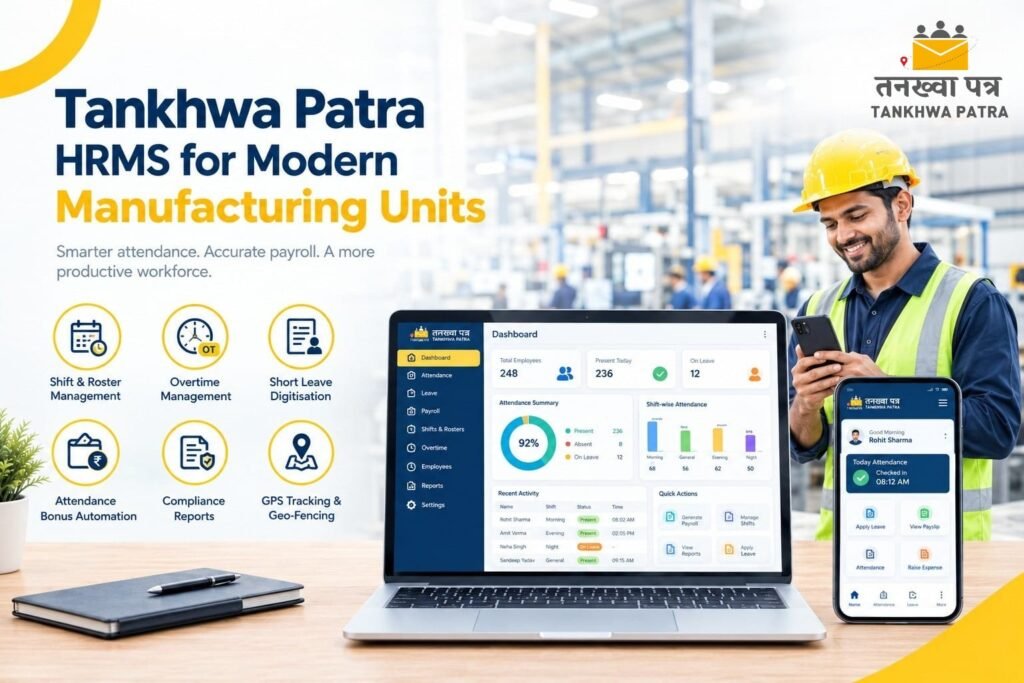
Quick answer: The best HRMS for a logistics company is one that tracks field and warehouse attendance with location checks, handles shifts and overtime, manages driver and helper payroll with advances and expenses, and keeps every hub and branch in one system. Tankhwa Patra HRMS covers these with app and device attendance, a paid GPS tracking and geo-fencing add-on, shift and overtime rules, expense management and payroll with PF, ESIC and PT reports. Confirm trip-based pay and contractor-wise needs with the team.
It is the 1st of the month, and the HR manager of a transport and warehousing company in Ahmedabad is closing payroll for 300 people spread across a head office, two warehouses, a hub in Surat and a fleet of delivery vehicles. Drivers have been on the road for days. Warehouse loaders work in three shifts. Delivery executives send trip details and fuel receipts on WhatsApp. Nobody can say for sure which driver was where on the 17th, and the overtime sheet is two days late.
This guide is for owners, HR heads, operations managers and accounts teams at transport, courier, warehousing, 3PL and last-mile delivery companies in Gujarat and across India. It explains what logistics companies need from an HRMS, why generic tools and spreadsheets fall short, how Tankhwa Patra HRMS helps, a comparison table, a 7-step workflow, a 10-point checklist for choosing the best HRMS in 2026, common mistakes and which plan to look at.
Please note: Working hours, overtime, driver duty rules, PF, ESIC, professional tax and contract labour requirements vary by state and change over time. This guide does not state any rates, limits or due dates, and it is not legal or tax advice. Features and pricing change, so verify them on the Tankhwa Patra website and with the team before you buy, and verify statutory details with a qualified CA, labour-law consultant or payroll professional.
What does a logistics company need from an HRMS?
A logistics company needs an HRMS that follows people who are not at a desk: drivers, delivery executives, warehouse staff and branch teams. It must record attendance by location and shift, calculate overtime and allowances, track expenses, and run payroll for every hub from one system.
- Field attendance with location checks: a punch from a driver’s phone or a hub device should show where it came from.
- Shift rosters for warehouses and hubs: loaders, sorters and dispatch staff rotate through morning, evening and night shifts.
- Overtime with approvals: peak-season and festive hours need approval and calculation before payroll runs.
- Multi-branch and multi-hub visibility: one view of attendance and headcount across all locations.
- Expense and advance management: fuel, tolls, meals and travel claims with proof, plus advances recovered through payroll.
- Contract and third-party staff: drivers, helpers and loaders often come through contractors or agencies.
- Payroll and compliance reports: salary slips, and PF, ESIC and PT reports generated from payroll data.
- A simple app for workers: attendance, leave and payslips on a phone, so staff stop calling HR.
Some logistics firms also need visit tracking for field executives, visitor gate passes for warehouses and asset tracking for devices, uniforms or tools. These come as separate modules or add-ons, so check what your plan covers.
Why do spreadsheets and generic tools fall short for logistics?
Spreadsheets and generic tools fall short because logistics staff are spread across vehicles, hubs and shifts, and each supervisor records things differently. Attendance arrives late, overtime is agreed verbally, expense claims reach HR as photos, and nobody can verify where a person was working.
- No proof of location: a driver or delivery executive marks attendance by phone call, and there is no check on where they were.
- Rotating warehouse shifts: loaders move between shifts, and the register still shows the old one.
- Night work across midnight: a night shift is counted as two partial days, or as an absence on one date.
- Contractor headcount mismatch: a contractor bills for 12 helpers while your register shows 10.
- Expense claims on WhatsApp: fuel and toll receipts arrive as photos with no approval trail.
- Advances forgotten: a driver’s advance is given in cash and recovered late or not at all.
- No live view: the operations head learns about absenteeism after the vehicle has already missed its slot.
Illustrative example (not real data): A delivery executive works a long shift during the festive rush. The attendance sheet shows a standard day, the manager’s WhatsApp message says four extra hours, and a fuel receipt is submitted two weeks later. Payroll pays the standard day, the extra hours are disputed, and the receipt is paid separately in cash. The fix is to record attendance with a location check, approve overtime against a written policy before the cut-off, and submit expenses through one claim flow.
How does Tankhwa Patra HRMS help logistics companies?
Tankhwa Patra HRMS brings attendance, shifts, overtime, expenses and payroll into one system. Staff punch through the app or devices, a paid add-on adds live GPS tracking and geo-fencing, shift and overtime rules are applied by policy, and approved data flows into salary slips and statutory reports. Features below are listed on tankhwapatra.com/features-of-hrms-software; some depend on your plan.
| Logistics pain point | Tankhwa Patra feature | What changes |
| Attendance for field and delivery staff | Web and app punch-in/out | Staff punch from their phone instead of calling the supervisor |
| No proof of location | Live GPS tracking and geo-fencing (paid add-on) | Location checks make a punch more reliable |
| Field visits and client or hub stops | Visit management | Visits are recorded instead of remembered |
| Warehouse and hub attendance | Biometric and device integration; TP Face devices; offline machine data upload | Hub punches land in one system, even with weak connectivity |
| Rotating warehouse shifts | Multiple and rotational shifts; shift roster creation | Each worker’s shift is assigned in the system |
| Peak-season overtime | Policy-based overtime rules, approvals and automated calculation | Approved hours are calculated before payroll |
| Fuel, toll and travel claims | Expense and reimbursement management | Claims are submitted with proof and approved before payout |
| Advances to drivers and helpers | Loan and advance management | Recoveries are tracked against payroll |
| Different week-offs across hubs | Week-off policies; multiple holiday calendars | Each hub’s pattern is applied by policy |
| Salary slips for hundreds of staff | Automated salary processing; automatic salary slip generation | Slips come from bulk processing after verification |
| Staff asking HR for slips and leave | Employee ESS app | Payslips, attendance and leave on the phone |
| Statutory reports | PF, ESIC and PT compliance reports | Reports are generated from payroll data |
| Owner cannot see all hubs | Live attendance monitoring; one-click reports; HR analytics | Operations heads see who is in, hub by hub |
| Visitors and vendors at the warehouse gate | Digital visitor gate pass | Entries are recorded digitally |
For trip-based pay, per-delivery incentives, driver duty-hour tracking, contractor-wise reports and any fleet-management or TMS integration, confirm with the Tankhwa Patra team before you decide. These depend on your setup and plan.
How do you use GPS and geo-fencing for logistics attendance?
Use GPS and geo-fencing to confirm where a punch came from, not to watch people constantly. Define each warehouse, hub or branch as a location, let staff punch from the app, and flag punches that fall outside the boundary. In Tankhwa Patra, live GPS tracking and geo-fencing is a paid add-on.
For warehouses and hubs
Set a boundary around each site, so a punch from outside the premises can be reviewed. Where staff share a device at the gate, use biometric or face-recognition punches instead, and use offline machine data upload if the network drops.
For drivers and delivery executives
Field staff may punch in at a depot or from a starting point, and visits or stops can be recorded as they work. Decide in advance what you track, for example attendance at start and end of duty or visit check-ins, rather than tracking everything all day.
Privacy and trust
Location tracking raises privacy questions. Tell staff what is tracked, when and why, write it into your policy, and follow applicable law. Accuracy also depends on phone, signal and area, so test it with a few real routes before rollout.
What is the best way to handle driver, helper and warehouse payroll?
The best way is to record attendance, overtime, allowances and advances in one place and process them together. Each component is approved before payroll closes, so the slip reflects what was actually worked and paid.
- Drivers: track attendance and duty days, approved overtime, advances and approved expense claims. Duty-hour and trip-based pay rules vary by company and by law, so confirm your setup with the team.
- Helpers and loaders: often hired through contractors, so keep them in the same system as permanent staff and tag the contractor or agency in whatever field your setup allows.
- Warehouse staff: assign shifts and week-offs by roster, apply the night-shift counting rule you chose, and approve overtime before the cycle closes.
- Office and branch staff: standard attendance, leave and payroll, using the same policies and reports.
Ask the Tankhwa Patra team how daily-wage payouts, per-trip or per-delivery pay, and contractor-wise reports are handled in your plan.
Spreadsheets vs a logistics HRMS: what is the difference?
A spreadsheet holds whatever someone types in; an HRMS records a time-stamped punch linked to a person, a shift and a location. Spreadsheets can work for a small team in one office, but they strain once you have drivers, hubs, shifts and contractors.
| Area | Spreadsheets and WhatsApp | Tankhwa Patra HRMS |
| Attendance source | Phone calls, sheets and photos | App, biometric and offline device data in one system |
| Proof of location | Supervisor’s word | Location checks with the paid GPS add-on |
| Warehouse shifts | Updated by hand | Multiple and rotational shifts assigned in the system |
| Field visits | Reported verbally | Visit management |
| Overtime | Verbal approval, entered late | Policy-based rules with approvals and automatic calculation |
| Expenses | Photos of receipts | Expense and reimbursement management with approvals |
| Advances | Cash and notebooks | Loan and advance management linked to payroll |
| Contract staff | Separate contractor sheets | Recorded alongside permanent staff |
| Salary slips | Built one by one | Generated automatically after bulk processing |
| Statutory reports | Compiled from many files | PF, ESIC and PT reports from payroll data |
| Worker access | Calling HR | Payslips, attendance and leave in the ESS app |
| Best for | One small office | Logistics firms with drivers, hubs and shifts |
What does a field-to-payroll workflow look like in logistics?
A logistics workflow runs from the first punch to a verified slip: capture attendance, check location, apply shifts, approve overtime, settle expenses and advances, process payroll and share slips. Each step uses the same record, so nothing is retyped between the road and the office.
- Capture attendance. Staff punch through the app or device at hubs, depots and starting points.
- Check location. Use geo-fencing, where the add-on is in use, to review punches from outside the defined boundary.
- Apply shifts and week-offs. Assign rosters for warehouses and the right week-off policy for each hub.
- Record visits. Log field visits and stops for staff who work outside a fixed site.
- Approve overtime. Supervisors approve extra hours against the policy before payroll closes.
- Settle expenses and advances. Approve fuel, toll and travel claims, and apply recoveries for advances.
- Process payroll and share slips. Run bulk salary processing, verify exceptions hub by hub and share slips through the ESS app.
How do you choose the best HRMS for a logistics company in 2026?
Choose the HRMS that fits how your people actually work: on the road, in warehouses and across hubs. Test it with one real week of attendance from a hub and a field team, and ask directly about anything that is not listed.
10-point checklist
- Field attendance. Records punches from the app, with location checks if you need them.
- GPS and geo-fencing. Ask what is included in the plan and what costs extra.
- Warehouse shifts. Supports multiple and rotational shifts, with night-shift rules.
- Overtime with approvals. Calculates approved hours by policy before payroll.
- Expenses and advances. Handles fuel, toll and travel claims with proof, and advance recovery.
- Multi-hub reporting. Shows attendance and headcount by branch, hub or depot.
- Contractor and contract staff. Keeps them with permanent staff; ask how contractor-wise reports work.
- Payroll and compliance reports. Processes salaries in bulk and generates PF, ESIC and PT reports.
- Worker app. Gives staff attendance, leave and payslips on their phone.
- Clear answers on gaps. Gives direct answers on trip-based pay, duty-hour tracking and any TMS or fleet-system integration; for Tankhwa Patra HRMS, confirm these with the Tankhwa Patra team.
Before a demo, list your hubs, the roles you want to track, the number of contract staff and how overtime and expenses are handled today, so you can test real scenarios instead of a generic walkthrough.
What mistakes should logistics companies avoid when choosing an HRMS?
The biggest mistakes are buying on feature lists without testing field attendance, turning on GPS without a policy, ignoring contractor staff and approving overtime after payroll closes. An HRMS works only when every hub follows the same process and someone checks exceptions daily.
- Choosing software that suits office staff only, then finding it cannot handle drivers and warehouse shifts.
- Rolling out GPS tracking without telling staff what is tracked and why.
- Not testing location accuracy on real routes, hubs and in low-signal areas.
- Keeping some hubs on paper or WhatsApp after the rollout.
- Leaving contractor staff out of the system, so headcount and costs do not add up.
- Agreeing overtime verbally and recording it after the payroll cut-off.
- Paying expenses outside the system, so claims are duplicated or unapproved.
- Assuming the software files returns or replaces a labour-law review. Reports help you prepare; confirm filings with your CA or consultant.
Which Tankhwa Patra plan suits a logistics company?
Tankhwa Patra offers three plans, Dreamer, Performer and Achiever, with higher plans adding more modules. Check current pricing on tankhwapatra.com/pricing and match the plan to what you need: attendance, shifts, overtime and payroll for every hub, plus modules such as visit management, expense management or asset management.
Live GPS tracking and geo-fencing is a paid add-on, so confirm its cost for your headcount. Some features depend on the plan, so ask the Tankhwa Patra team which plan covers your number of hubs, field staff and must-have modules.
What do logistics owners and HR teams ask about HRMS?
Which is the best HRMS for logistics companies in India?
The best HRMS is the one that handles field attendance with location checks, warehouse shifts, overtime, expenses and payroll for every hub. Test any option with a real week of your own data, including drivers and contractor staff, before you decide.
Can an HRMS track attendance for drivers and delivery staff?
Yes. With app punch-in, drivers and delivery executives can mark attendance from their phone, and location checks are available through the paid GPS and geo-fencing add-on in Tankhwa Patra. Visit management records stops and visits. Confirm duty-hour and trip-based tracking with the team.
How does geo-fencing work for warehouse attendance?
Geo-fencing defines a boundary around a warehouse or hub and flags punches made from outside it. Accuracy depends on the phone and the site, so test it at your own locations, and tell staff what is tracked and why.
How do you manage night shifts in a warehouse?
Decide which date a night shift belongs to, usually the date it started, then set that rule in the shift settings. Rules on night work and allowances vary by state, so confirm them with your CA or labour-law consultant.
Can one system manage permanent and contract drivers and helpers?
Yes, in principle. Tankhwa Patra HRMS lets you add employees individually or in bulk and track them through their lifecycle, so contract staff can sit alongside permanent staff. How contractor-wise tagging and reports work depends on your plan, so confirm with the Tankhwa Patra team.
Can fuel and toll expenses be claimed in the HRMS?
Tankhwa Patra lists expense and reimbursement management, so staff can submit claims with proof and managers can approve them before payout. Check how your own expense categories and limits would be set up.
Does the software file PF and ESIC returns?
Tankhwa Patra lists PF, ESIC and PT compliance reports among its features. These reports help HR teams prepare statutory work, but you should confirm filings and current rules with a qualified CA or payroll professional.
Conclusion
Spreadsheets and WhatsApp can work for a small office, but they break once you have drivers on the road, warehouses on shifts, contractors and festive-season overtime. Every re-typed sheet is another chance for a wrong paid-day count, a lost receipt or a disputed hour.
A central HRMS gives operations heads, HR and accounts one set of records, one set of rules and one payroll run across every hub. Use the 10-point checklist during a demo and test it with a real week of data from a warehouse and a field team.
Book a Free Demo or Start a Free Trial of Tankhwa Patra HRMS at tankhwapatra.com.
Call: +91 70418 01390 | +91 89809 38940
Disclaimer: The information provided is for general informational purposes only. It may vary over time, so we recommend verifying the details independently before making any decisions.
